One-click invoices
A delivered order becomes an invoice in one click: products, prices and VAT come from the order.
Invoice delivered orders in one click, with automatic numbering and the right VAT. Tavalle e-mails the PDF to your customer and follows every payment, so late payers never slip through.
A delivered order becomes an invoice in one click: products, prices and VAT come from the order.
An invoice starts as a draft you can edit. When you finalize it, it gets the next number of its series (F2026-0001, F2026-0002…): sequential, with no gaps, and locked.
Give each customer a country, a VAT number and a type (business or private): quotes and orders get the right rate on their own — your domestic VAT, 0 % reverse charge for EU businesses, intra-Community supply for goods, 0 % outside the EU — and the legal text is printed on the invoice.
Quotes, invoices, credit notes and every e-mail go out in the customer’s language — English, Spanish or French — while your team keeps working in theirs.
A school or a customer with a reduced rate keeps its own VAT, with its exemption note printed on every invoice.
The invoice PDF is e-mailed to the customer and recorded in the customer’s history. Lost e-mail or new accounting address? Send it again from the invoice list in one click, with a personal note.
Each invoice has a pay-by date. Overdue invoices turn red, and quick filters show pending, overdue and paid invoices with their totals.
Sales reps receive an e-mail about their overdue invoices and the ones due this week.
Record supplier invoices with their files, filter them by date, export them to Excel or download all files as a ZIP — per supplier, or every supplier in one list.
Hosting, domains, phones or rent: set them up once, monthly, quarterly or yearly, and each invoice is created on its date, or waits in “To register” when the amount changes. Accounting gets one e-mail.
Choose a company and a month, quarter, half-year or year: one ZIP with the PDF of every invoice and credit note, the supplier invoices and the freelance reps’ commission invoices, plus an Excel summary with the totals — ready for your accountant.
If your group has several companies, each one issues invoices with its own numbering.
Paid invoices are locked, so nobody can change them by mistake.
Cancel an invoice in full or in part — by lines or by amount. Credit notes have their own numbering (R2026-0001) and are e-mailed to the customer with the PDF.
Invoice in euros or in any other currency. Daily ECB exchange rates are loaded automatically, with charts for 29 currencies.
Unpaid invoices trigger polite reminders to the customer after the number of days you choose, with the invoice PDF attached.
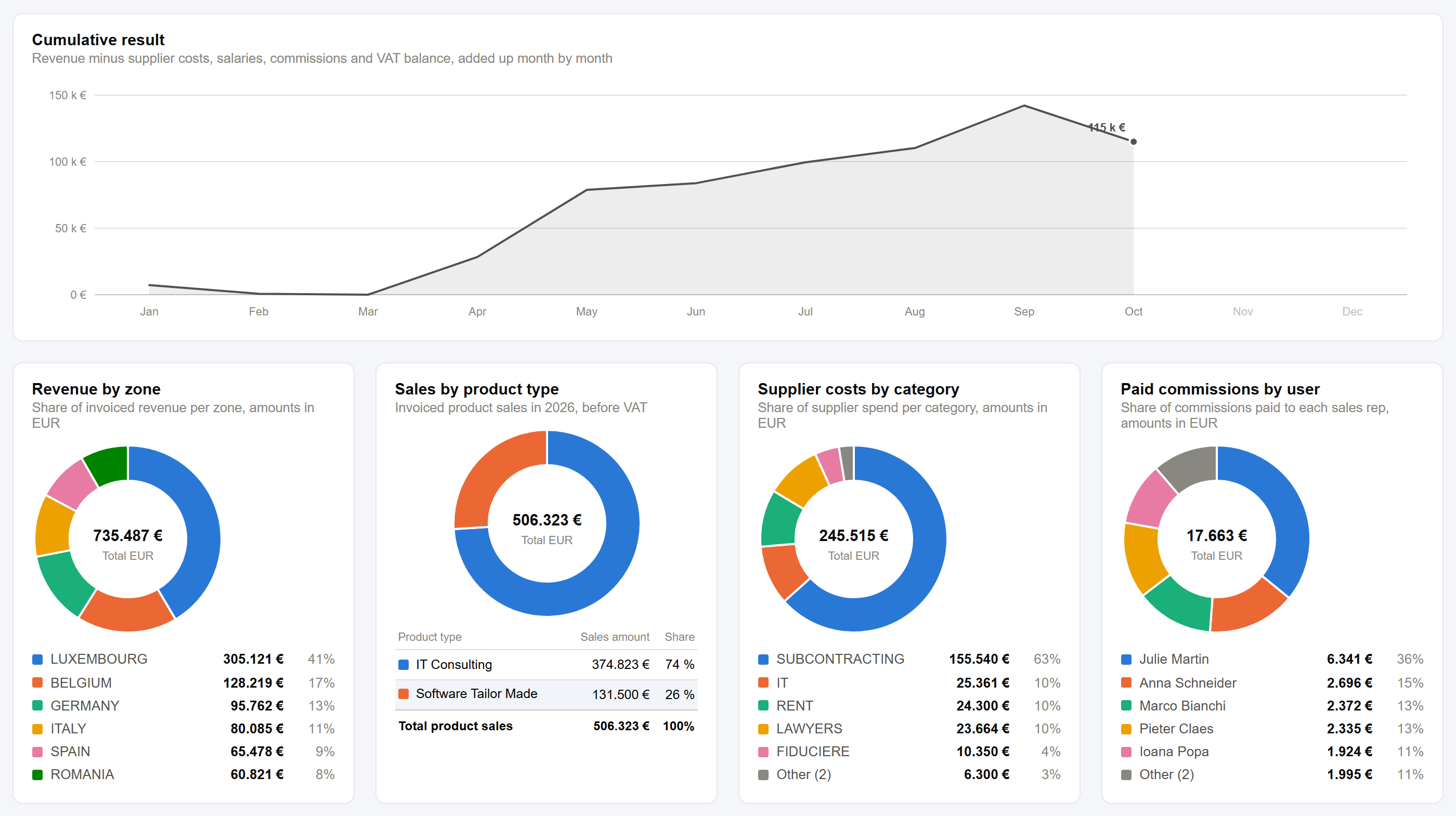
Every invoice flows into the Finance dashboard: revenue, supplier costs, salaries, commissions and VAT balance, month by month and zone by zone.
You see your real result every day, not only when the accountant closes the year.
Yes. An invoice gets its number when you finalize it: the next one of its series per issuing company and year (for example F2026-0001), sequential and without gaps. Drafts have no number yet.
Yes. If your group has several companies, each one issues invoices with its own numbering.
Overdue invoices are highlighted in red and listed with their totals, sales reps get an e-mail about their overdue invoices, and commissions are only earned once the invoice is paid.
No. Tavalle handles invoicing, payments and a real-time view of your finances, while your accountant keeps the official accounts. Lists export to Excel, the accounting export gives your accountant every invoice of a period in one ZIP with an Excel summary, and a connection to your accounting software can be built as implementation work.
Yes, with a credit note: in full, by lines or by amount. The original invoice is never changed or renumbered.
Yes. Each invoice can use any currency, and daily ECB exchange rates are loaded automatically.
Yes. From the issuing company’s country and the customer’s country, type and VAT number, Tavalle sets the rate of each quote and order: domestic VAT, 0 % reverse charge or intra-Community supply for EU businesses, export or out of scope outside the EU, and the One-Stop Shop for private customers when you use it. VAT numbers can be checked in VIES, and you can always type another rate.
Yes. Each customer has a language — English, Spanish or French — and their quotes, invoices, credit notes and e-mails use it, whatever language your team works in.
Ask for a demo of our business software, or tell us about custom software for our team in Luxembourg. We reply within one business day — in English, French or Spanish.
Your request has been sent. We will reply within one business day.